Dino Run
In this tutorial, we’ll build an infinite runner similar to the famous “Dino” game. You will learn how to handle gravity, animate characters using text-based sprites, and manage different game states (Menu, Playing, and Game Over).
Defining the Sprites
Section titled “Defining the Sprites”Since we don’t want to use image files yet, we represent our characters using lists of strings. Each # represents a pixel.
SPRITE_DINO_RUN1 = [ " #### ", " ## ##", " #####", " # ##### ", " ##########", " ##########", " ######## ", " # # ", " ## "]How Scaling Works
Section titled “How Scaling Works”To draw these, we use a helper function called draw_sprite(). It works like a printer: it looks at every character in our list and decides how to draw them.
The first loop goes line-by-line (rows), and the second loop goes character-by-character (columns).
We multiply the position (col_idx) by the scale. If the scale is 2, the first pixel is at 0, the second is at 2, the third is at 4, and so on. This “spreads” the dino out to make it bigger.
Instead of drawing one tiny pixel, we use drect to draw a filled box of size scale.
Here is the code to render our Dino at three different sizes:
from gint import *
SPRITE_DINO_RUN1 = [    "      #### ",    "      ## ##",    "      #####",    " #   ##### ",    " ##########",    " ##########",    "  ######## ",    "   #   #   ",    "   ##      "]
def draw_sprite(sprite, x, y, scale=2):    """Draws a text-based sprite string at a specific scale."""    for row_idx, row in enumerate(sprite):        for col_idx, char in enumerate(row):            if char == "#":                # Calculate the top-left of our 'pixel block'                px = x + (col_idx * scale)                py = y + (row_idx * scale)
                # Draw a filled rectangle.                # We use 'scale - 1' so the box is exactly the right size.                drect(px, py, px + scale - 1, py + scale - 1, C_BLACK)
# Visualizing the Scalesdclear(C_WHITE)
# 1x Scale (Original size)dtext(10, 5, C_BLACK, "1x")draw_sprite(SPRITE_DINO_RUN1, 10, 25, scale=1)
# 2x Scale (Standard for our game)dtext(40, 5, C_BLACK, "2x")draw_sprite(SPRITE_DINO_RUN1, 40, 25, scale=2)
# 4x Scale (Extra Large)dtext(100, 5, C_BLACK, "4x")draw_sprite(SPRITE_DINO_RUN1, 100, 25, scale=4)
dupdate()getkey()Physics: Jumping and Gravity
Section titled “Physics: Jumping and Gravity”To make the dino jump, we use two variables: player_y (position) and player_dy (velocity).
When the user presses UP, we set player_dy to a negative number (moving up).
Every frame, we add player_dy to player_y.
We then add a constant (Gravity) to player_dy to pull the dino back down.
# Gravity logicgame.player_y += game.player_dyif game.player_y < 0: game.player_dy += 1 # Pulling downelse: game.player_y = 0 # Stay on ground game.is_jumping = FalseYou can now ues this to create a simple jumping game :
from gint import *
WIDTH = DWIDTHHEIGHT = DHEIGHTGROUND_Y = HEIGHT - 20
SPRITE_DINO_RUN1 = [    "      #### ",    "      ## ##",    "      #####",    " #   ##### ",    " ##########",    " ##########",    "  ######## ",    "   #   #   ",    "   ##      "]
def draw_sprite(sprite, x, y, scale=2):    """Draws a text-based sprite string at a specific scale."""    for row_idx, row in enumerate(sprite):        for col_idx, char in enumerate(row):            if char == "#":                px = x + (col_idx * scale)                py = y + (row_idx * scale)                drect(px, py, px + scale - 1, py + scale - 1, C_BLACK)
def main():    player_y = 0      # Relative offset from ground    player_dy = 0     # Vertical velocity    is_jumping = False
    while True:        dclear(C_WHITE)
        # Using pollevent() to read key pressed        cleareventflips()        ev = pollevent()        while ev.type != KEYEV_NONE:            if ev.type == KEYEV_DOWN:                # Jump if Up or Numpad 8 is pressed                if ev.key in [KEY_UP, KEY_8] and not is_jumping:                    player_dy = -8                    is_jumping = True            ev = pollevent()
        # Apply velocity to the offset        player_y += player_dy
        # If player is in the air (offset < 0)        if player_y < 0:            player_dy += 1 # Gravity pulls down (increases dy)        else:            # Landing logic            player_y = 0            player_dy = 0            is_jumping = False
        # Draw the floor line        dline(0, GROUND_Y, WIDTH, GROUND_Y, C_BLACK)
        # Draw the Dino relative to the ground        # 18 is the height of the sprite at scale 2        py = GROUND_Y - 18 + player_y        draw_sprite(SPRITE_DINO_RUN1, 20, int(py))
        dtext(10, 5, C_BLACK, "Press UP to Jump")
        dupdate()
        # Exit on DEL key        if keydown(KEY_DEL):            break
main()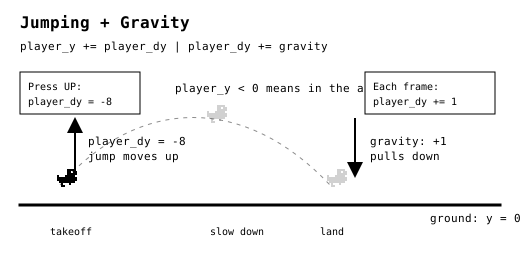
Obstacles and Collision
Section titled “Obstacles and Collision”Obstacles are stored in a list. Every frame, we move them to the left. If an obstacle goes off-screen (x < 0), we remove it and increase the score.
For collisions, we use Bounding Box (AABB) logic. If the rectangle of the player overlaps with the rectangle of a cactus, it’s Game Over.
Understanding AABB Collision
Section titled “Understanding AABB Collision”Axis-Aligned Bounding Boxes (AABB) are the simplest way to detect if two objects are touching. It assumes objects are rectangles that are not rotated.
The Logic
Section titled “The Logic”For two rectangles to collide, all four of these conditions must be true:
- The Left of A is to the left of the Right of B.
- The Right of A is to the right of the Left of B.
- The Top of A is above the Bottom of B.
- The Bottom of A is below the Top of B.
AABB Code implementation
Section titled “AABB Code implementation”In our Python code, we write it like this:
def check_collision(ax, ay, aw, ah, bx, by, bw, bh): return ( ax < bx + bw and # A's left < B's right ax + aw > bx and # A's right > B's left ay < by + bh and # A's top < B's bottom ay + ah > by # A's bottom > B's top )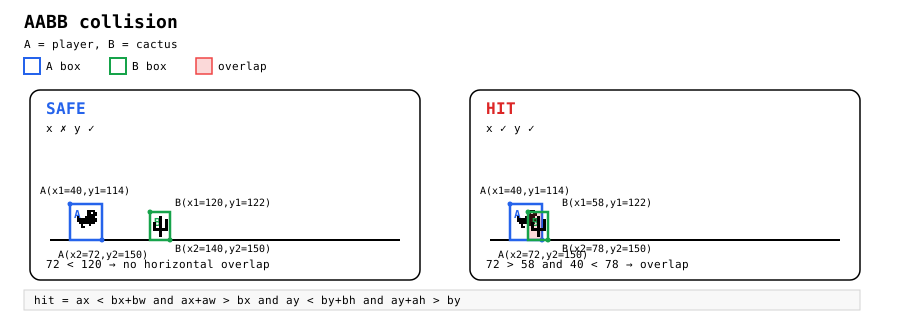
From that, we can create a small game demo that would move the cactus with keys to visualize collisions:
from gint import *
# Screen dimensionsWIDTH = DWIDTHHEIGHT = DHEIGHT
# Rendered at 4x scaleSPRITE_DINO = [    "      #### ",    "      ## ##",    "      #####",    " #   ##### ",    " ##########",    " ##########",    "  ######## ",    "   #   #   ",    "   ##      "]
SPRITE_CACTUS = [    "  #  ",    "  # #",    "# # #",    "# # #",    "#####",    "  #  ",    "  #  "]
def draw_sprite(sprite, x, y, scale=4):    for row_idx, row in enumerate(sprite):        for col_idx, char in enumerate(row):            if char == "#":                px = x + (col_idx * scale)                py = y + (row_idx * scale)                drect(px, py, px + scale - 1, py + scale - 1, C_BLACK)
def check_collision(px, py, pw, ph, ox, oy, ow, oh):    """AABB Collision Logic"""    return (px < ox + ow and            px + pw > ox and            py < oy + oh and            py + ph > oy)
# Initial Setupplayer_x, player_y = 10, HEIGHT - 76cactus_x, cactus_y = 80, HEIGHT - 68ground_y = HEIGHT - 40
while True:    dclear(C_WHITE)
    # Input Handling    cleareventflips()    ev = pollevent()
    if keydown(KEY_LEFT):        cactus_x -= 3    elif keydown(KEY_RIGHT):        cactus_x += 3
    # Hitbox dimensions (Scale 4)    # Dino: 8x9 -> 32x36 | Cactus: 5x7 -> 20x28    is_colliding = check_collision(player_x, player_y, 32, 36, cactus_x, cactus_y, 20, 28)    hitbox_color = C_RED if is_colliding else C_BLUE
    # Drawing    dline(0, ground_y, WIDTH, ground_y, C_BLACK)
    # Player + Hitbox    drect_border(player_x, player_y, player_x + 32, player_y + 36, C_WHITE, 1, hitbox_color)    draw_sprite(SPRITE_DINO, player_x, player_y, 4)
    # Cactus + Hitbox    drect_border(cactus_x, cactus_y, cactus_x + 20, cactus_y + 28, C_WHITE, 1, hitbox_color)    draw_sprite(SPRITE_CACTUS, cactus_x, cactus_y, 4)
    status = "HIT!" if is_colliding else "SAFE"    dtext(5, 5, hitbox_color, status)    dtext(5, 15, C_BLACK, "LEFT/RIGHT to move Cactus")
    dupdate()    if keydown(KEY_DEL): break
Menus and States
Section titled “Menus and States”In the previous parts, we jumped straight into the action. But a real game needs a beginning and an end. This is where Game States come in.
What is a State Machine?
Section titled “What is a State Machine?”A State Machine is just a fancy way of saying: “The game behaves differently depending on what ‘mode’ it is in.”
Implementing States in Python
Section titled “Implementing States in Python”We use a single variable (like game_state) and an if/elif block inside our main loop to control what gets drawn and what logic runs.
STATE_MENU = 0STATE_PLAYING = 1STATE_GAMEOVER = 2
state = STATE_MENU
while True:    if state == STATE_MENU:        draw_menu_text()        if keydown(KEY_EXE):            state = STATE_PLAYING # Transition!
    elif state == STATE_PLAYING:        run_game_physics()        if check_collision():            state = STATE_GAMEOVER # Transition!
    elif state == STATE_GAMEOVER:        draw_death_screen()        if keydown(KEY_EXE):            reset_game()            state = STATE_PLAYING
Why constants?
Section titled “Why constants?”Instead of checking if state == 0, we use if state == STATE_MENU. This makes the code readable for humans. 0 and 1 are just numbers, but STATE_MENU tells a story.
Transitioning
Section titled “Transitioning”A “Transition” is simply changing the value of the state variable. This is usually triggered by an Event (like a key press) or a Condition (like a collision).
from gint import *
# Define state constants for readabilitySTATE_MENU = 0STATE_PLAYING = 1STATE_GAMEOVER = 2
class Game:    def __init__(self):        # Start the game in the Menu state        self.state = STATE_MENU        self.message = "MAIN MENU"
    def transition(self):        """Logic to cycle through states when a button is pressed."""        if self.state == STATE_MENU:            self.state = STATE_PLAYING            self.message = "GAMEPLAY ACTIVE"        elif self.state == STATE_PLAYING:            self.state = STATE_GAMEOVER            self.message = "GAME OVER SCREEN"        elif self.state == STATE_GAMEOVER:            self.state = STATE_MENU            self.message = "BACK TO MENU"
# Initialize the game objectgame = Game()
while True:    # Clear the screen every frame    dclear(C_WHITE)
    cleareventflips()    ev = pollevent()    while ev.type != KEYEV_NONE:        if ev.type == KEYEV_DOWN:            # When EXE is pressed, trigger the transition logic            if ev.key == KEY_EXE:                game.transition()        ev = pollevent()
    # The 'if/elif' block determines what the user sees    if game.state == STATE_MENU:        # Style for the Menu state        drect_border(10, 10, DWIDTH-10, DHEIGHT-10, C_WHITE, 1, C_BLACK)        dtext(80, DHEIGHT//2 - 5, C_BLACK, game.message)        dtext(80, DHEIGHT//2 + 10, C_BLUE, "Press EXE to Play")
    elif game.state == STATE_PLAYING:        # Style for the Playing state        drect(0, 0, DWIDTH, 15, C_BLACK)        dtext(5, 4, C_WHITE, game.message)        dtext(80, DHEIGHT//2, C_BLACK, "Game Running...")        dtext(80, DHEIGHT//2 + 15, C_RED, "Press EXE to Die")
    elif game.state == STATE_GAMEOVER:        # Style for the Game Over state        dclear(C_BLACK)        dtext(80, DHEIGHT//2 - 5, C_WHITE, game.message)        dtext(80, DHEIGHT//2 + 10, C_WHITE, "EXE: Return to Menu")
    # Update the display    dupdate()
    # Safety exit for the simulator/calculator    if keydown(KEY_DEL):        break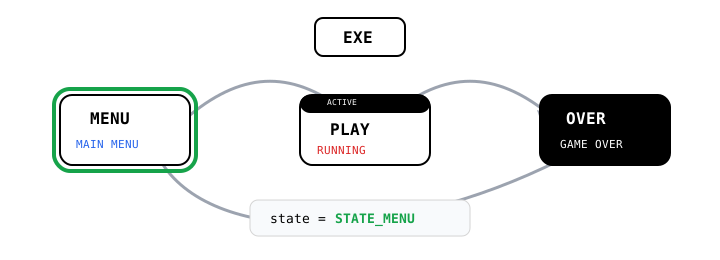
Final Code
Section titled “Final Code”Here is the complete game logic. Note that we use pollevent() for jumps (one-time press) and keydown() for ducking (holding the key).
from gint import *import random
# Game StatesSTATE_MENU = 0STATE_PLAYING = 1STATE_GAMEOVER = 2
# SpritesSPRITE_DINO_RUN1 = [    "      #### ",    "      ## ##",    "      #####",    " #   ##### ",    " ##########",    " ##########",    "  ######## ",    "   #   #   ",    "   ##      "]
SPRITE_DINO_RUN2 = [    "      #### ",    "      ## ##",    "      #####",    " #   ##### ",    " ##########",    " ##########",    "  ######## ",    "   #   #   ",    "       ##  "]
SPRITE_DINO_DUCK = [    "           ",    "           ",    "           ",    "      #####",    " ##########",    "###########",    " ##########",    "  #      # "]
SPRITE_CACTUS = [    "  #  ",    "  # #",    "# # #",    "# # #",    "#####",    "  #  ",    "  #  "]
class Game:    def __init__(self):        self.state = STATE_MENU        self.score = 0        self.high_score = 0        self.player_y = 0        self.player_dy = 0        self.is_jumping = False        self.is_ducking = False        self.ground_y = DHEIGHT - 40        self.frame_count = 0        self.obstacles = []        self.spawn_timer = 0
    def reset(self):        self.state = STATE_PLAYING        self.score = 0        self.player_y = 0        self.player_dy = 0        self.is_jumping = False        self.obstacles = []        self.spawn_timer = 60
def draw_sprite(sprite, x, y, scale=2):    for row_idx, row in enumerate(sprite):        for col_idx, char in enumerate(row):            if char == "#":                px = x + (col_idx * scale)                py = y + (row_idx * scale)                drect(px, py, px + scale - 1, py + scale - 1, C_BLACK)
def check_collision(px, py, pw, ph, ox, oy, ow, oh):    return px < ox + ow and px + pw > ox and py < oy + oh and py + ph > oy
game = Game()
# Main Loopwhile True:    dclear(C_WHITE)
    # Input    ev = pollevent()    if ev.type == KEYEV_DOWN:        if game.state != STATE_PLAYING:            if ev.key in [KEY_EXE, KEY_5]: game.reset()        elif ev.key in [KEY_UP, KEY_8] and not game.is_jumping:            game.player_dy = -10            game.is_jumping = True
    game.is_ducking = keydown(KEY_DOWN) or keydown(KEY_2)
    # Logic    if game.state == STATE_PLAYING:        game.frame_count += 1        game.player_y += game.player_dy        if game.player_y < 0:            game.player_dy += 1        else:            game.player_y = 0            game.player_dy = 0            game.is_jumping = False
        game.spawn_timer -= 1        if game.spawn_timer <= 0:            game.obstacles.append([DWIDTH, "cactus"])            game.spawn_timer = random.randint(40, 80)
        # Collision & Movement        p_rect = (25, game.ground_y - 18 + game.player_y, 16, 18)        if game.is_ducking and not game.is_jumping:            p_rect = (25, game.ground_y - 10, 20, 10)
        new_obs = []        for obs in game.obstacles:            obs[0] -= 6            o_rect = (obs[0], game.ground_y - 14, 10, 14)            if check_collision(p_rect[0], p_rect[1], p_rect[2], p_rect[3], o_rect[0], o_rect[1], o_rect[2], o_rect[3]):                game.state = STATE_GAMEOVER                if game.score > game.high_score: game.high_score = game.score            if obs[0] > -20: new_obs.append(obs)            else: game.score += 1        game.obstacles = new_obs
    # Rendering    dline(0, game.ground_y, DWIDTH, game.ground_y, C_BLACK)    if game.state == STATE_MENU:        dtext(DWIDTH//2 - 40, DHEIGHT//2, C_BLACK, "DINO RUN")        dtext(DWIDTH//2 - 60, DHEIGHT//2 + 20, C_BLACK, "Press EXE to Start")    elif game.state in [STATE_PLAYING, STATE_GAMEOVER]:        py = game.ground_y - 18 + game.player_y        if game.is_ducking and not game.is_jumping:            draw_sprite(SPRITE_DINO_DUCK, 25, game.ground_y - 16)        else:            anim = SPRITE_DINO_RUN1 if (game.frame_count // 5) % 2 == 0 or game.is_jumping else SPRITE_DINO_RUN2            draw_sprite(anim, 25, py)        for obs in game.obstacles:            draw_sprite(SPRITE_CACTUS, obs[0], game.ground_y - 14)        dtext(10, 10, C_BLACK, "Score: " + str(game.score))
    if game.state == STATE_GAMEOVER:        dtext(DWIDTH//2 - 40, DHEIGHT//2 - 10, C_BLACK, "GAME OVER")        dtext(DWIDTH//2 - 45, DHEIGHT//2 + 10, C_BLACK, "High: " + str(game.high_score))
    dupdate()