3. Custom Activities
When standard pickers aren’t enough, you need an Activity. An Activity is a Python class that draws its own custom layout, handles its own event loop, and summons cinput.input only when needed.
We’ll use cinput.ListView to create a custom scrolling interface embedded in our app.
Advanced Component: List View
Section titled “Advanced Component: List View”The ListView widget is the beast powering the pick() function, but you can embed it inside your own windows to show data, settings, or tools.
import cinputfrom gint import *
def run_activity():    items = [        {'type': 'section', 'text': 'Options', 'height': 30},        {'type': 'item', 'text': 'Graphics', 'height': 50, 'arrow': True},        {'type': 'item', 'text': 'Notification', 'height': 50, 'arrow': True},        {'type': 'item', 'text': 'Gameplay', 'height': 50, 'arrow': True},        {'type': 'item', 'text': 'Power Usage', 'height': 50, 'arrow': True},        {'type': 'item', 'text': 'Storage', 'height': 50, 'arrow': True}    ]
    # Set coordinates: (X, Y, W, H)    my_list = cinput.ListView((0, 40, 320, 528-40), items)
    running = True    while running:        dclear(C_WHITE)
        # Draw a custom header        drect(0, 0, 320, 40, 0x528a)        dtext(10, 10, C_WHITE, "Activity Menu")
        my_list.draw()        dupdate()
        cleareventflips()
        events = []        ev = pollevent()        while ev.type != KEYEV_NONE:            events.append(ev)            ev = pollevent()
        # Let ListView handle touch/scrolls!        action = my_list.update(events)
        if action:            # action is ('click', index, item)            print("User tapped:", action[2]['text'])
            # Maybe launch an input box if they click an item            if action[2]['text'] == 'Graphics':                cinput.pick(["High", "Medium", "Low"], "Graphics Quality")
        for e in events:             if e.type == KEYEV_DOWN and e.key == KEY_EXIT:                  running = False
run_activity()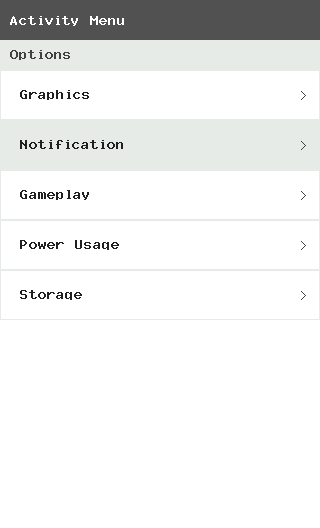
Interactivity the Smart Way
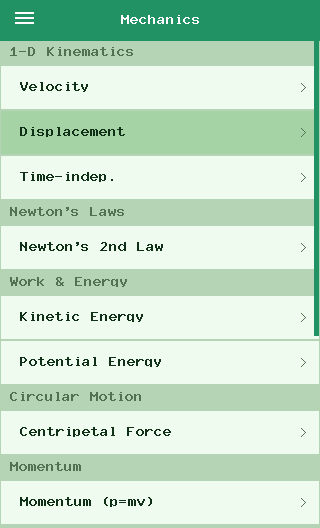
Section titled “Interactivity the Smart Way”The physchem_mod.py app is a perfect example of an Activity. It creates a SolverActivity filled with interactive math fields. It runs a loop, and when someone clicks a math variable, it internally calls cinput.input(..., type="numeric_float"), recalculates the answer, and redraws!
The main list view:
And the SolverActivity :
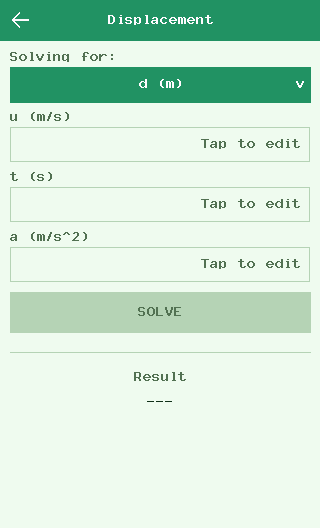
Instead of writing massive monolithic scripts, break your UI down into smaller Activities and let them handle their own rendering and interaction loops.
Now, go build something awesome!